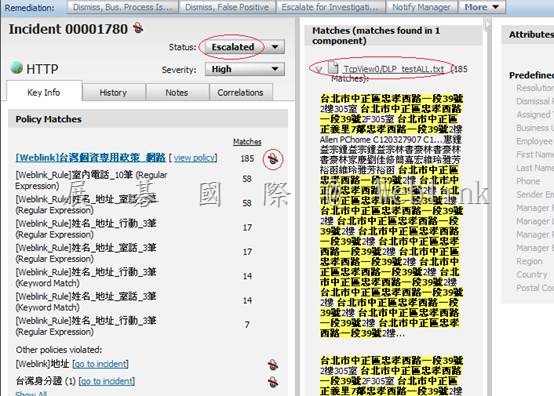
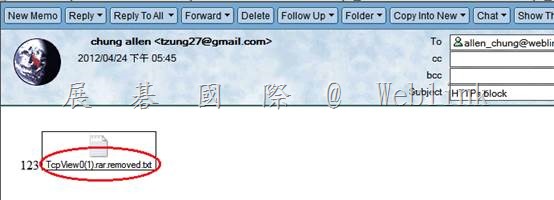
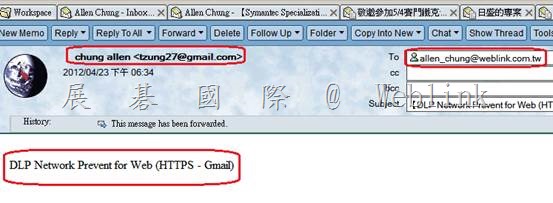
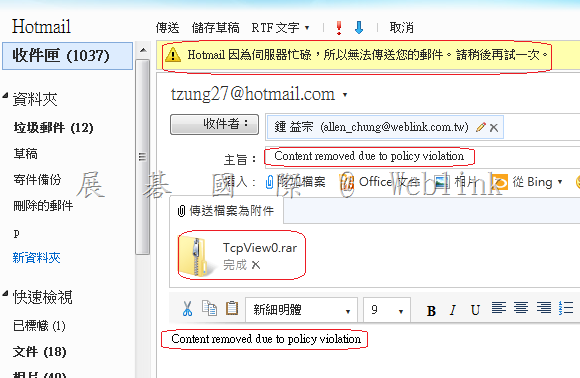
分類: Uncategorized

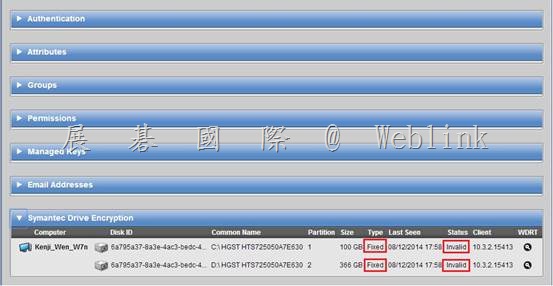
  • 【用戶端硬碟已完成加密,並且能成功進行 policy update,但在主控台 WDE disk Status 卻顯示 Invalid】

    WDE Disk Status is Invalid

    【用戶端硬碟已完成加密,並且能成功進行 policy update,但在主控台 WDE disk Status 卻顯示 Invalid】

    clip_image002

    參考官網 KB

    KB http://www.symantec.com/business/support/index?page=content&id=TECH149150

    http://www.symantec.com/connect/forums/pgp-unable-decrypt-error-12198

    解決步驟

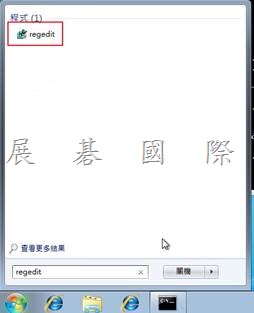
    1. Click Start.

    2. Type regedit in the Start Search field, and then click the regedit result in the Programs list.

    clip_image004

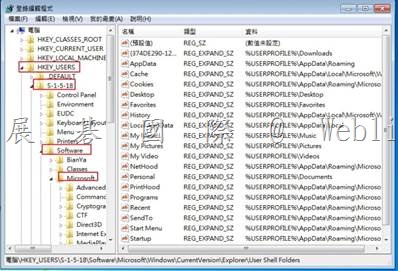
    3. Browse to HKEY_USERS\S-1-5-18\Software\Microsoft\Windows\CurrentVersion\Explorer\User Shell Folders.

    4. Select the folder and right-click the right pane in the Registry Editor.

    clip_image006

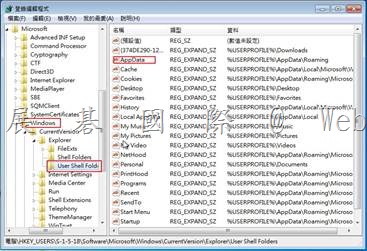
    5. Type AppData for the value.

    clip_image008

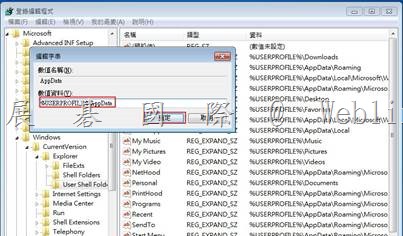
    6. Right-click the AppData value and select Modify.

    7. Type %USERPROFILE%\Application Data for the Value data and click OK.

    clip_image010

    8. Close the Registry Editor.

    9. Update policy

  • Hello world! 哈囉!

    歡迎來到 WordPress。這是你的第一篇文章。編輯或者刪除本篇文章,然後開始你的部落客生活!

  • Symantec DLP Network Discover for MS SQL

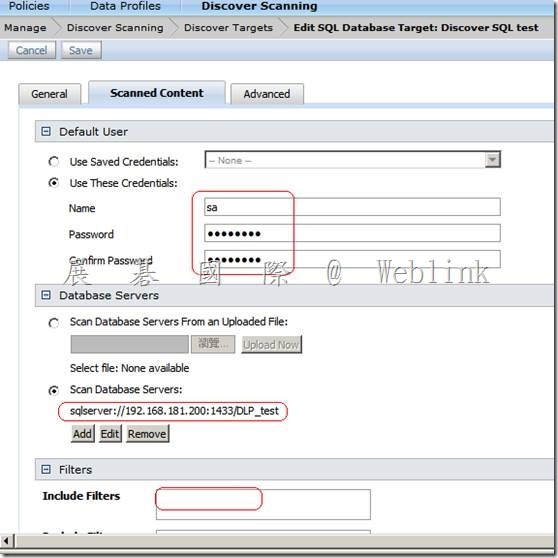
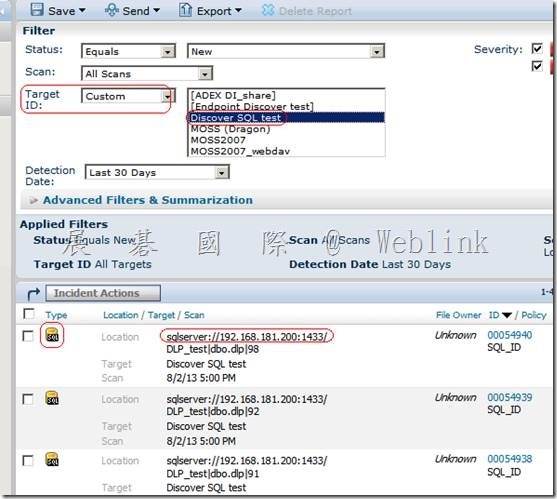
    Symantec DLP Network Discover for MS SQL

    您必須安裝 JDBC 驅動程式,才能掃描每種資料庫類型。

    安裝 JDBC 驅動程式

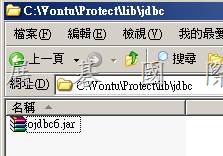
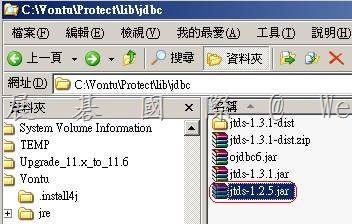
    1 取得相關 JDBC 驅動程式。

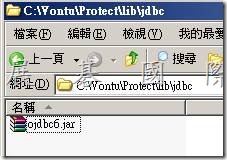
    l Oracle 驅動程式已隨 Network Discover Server 一起安裝在預設 SQL 驅動

    程式目錄 Protect/lib/jdbc 中。
    clip_image002

    JDBC 驅動程式為 Oracle JDBC 驅動程式 10.2.0.3.0 版。

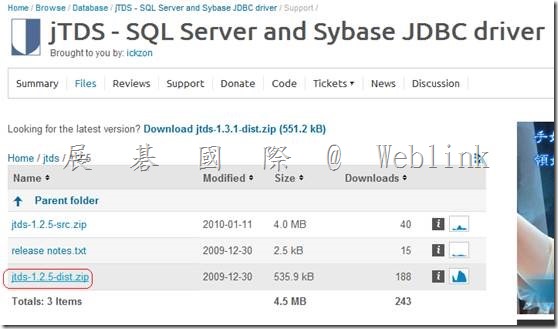
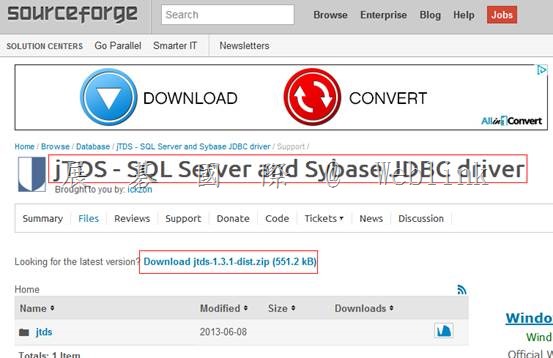
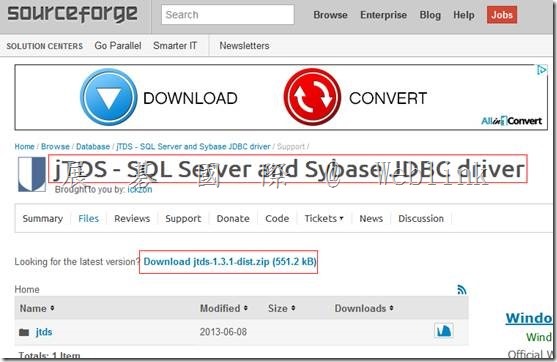
    l 對於 Microsoft SQL Server,開放來源驅動程式 jTDS 可從 Source Forge 取

    得,其網址為:http://jtds.sourceforge.net/

    http://sourceforge.net/projects/jtds/files/

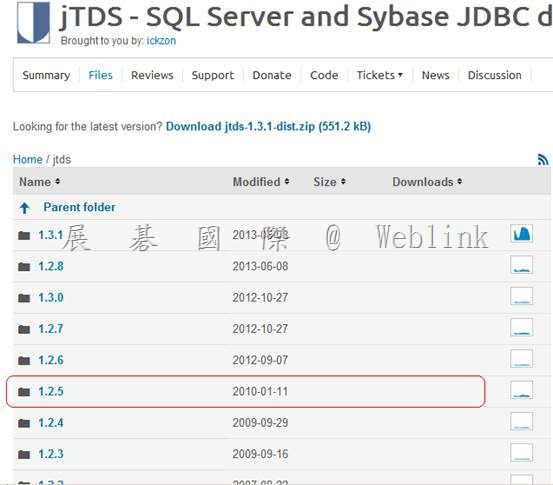
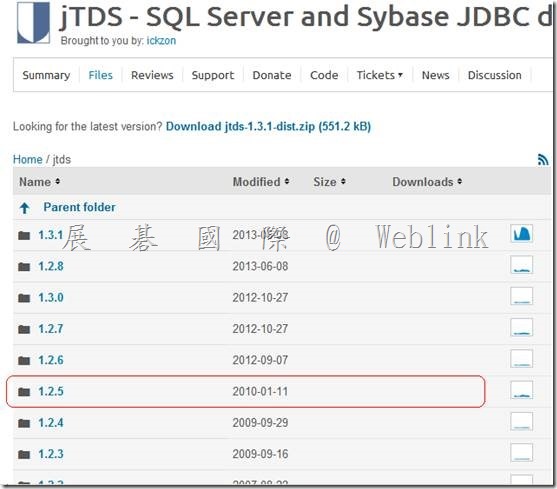
    1.3.1 太新不支援
    clip_image004

    jTDS – SQL Server and Sybase JDBC driver – Browse -jtds at SourceForge.net

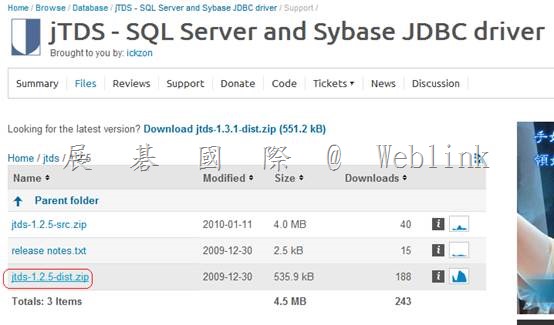
    http://sourceforge.net/projects/jtds/files/jtds/
    clip_image006

    clip_image008

    jTDS JDBC 驅動程式 1.2.2 版已經 Network Discover 測試過。

    l 若為 DB2,IBM 驅動程式 JAR 檔案位於 IBM DB2 發布的 java 資料夾下。

    您可以從 IBM 網站 http://www.ibm.com/db2 取得這些檔案。

    設定 SQL 資料庫的掃描1011

    安裝 SQL 資料庫目標的 JDBC 驅動程式

    IBM JDBC 驅動程式 1.4.2 版已經 Network Discover 測試過。

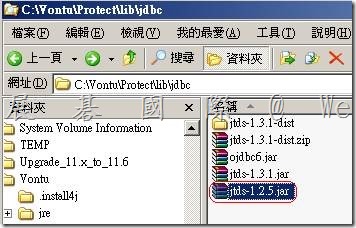
    2 將驅動程式檔案複製到預設 SQL 驅動程式目錄 Protect/lib/jdbc。
    clip_image010

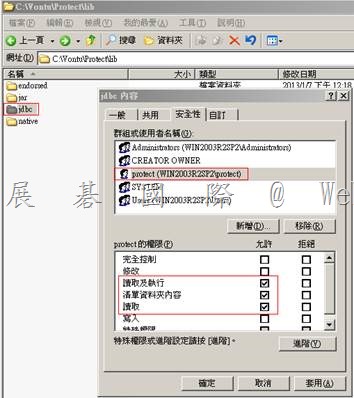
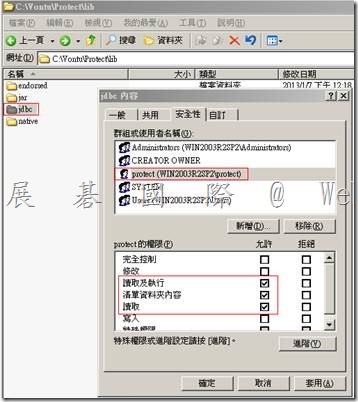
    3 變更 JDBC 驅動程式檔案的權限,讓 Protect 使用者至少具有閱讀權限。
    clip_image012

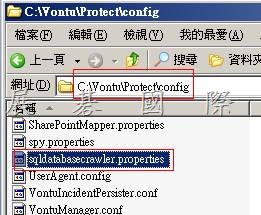
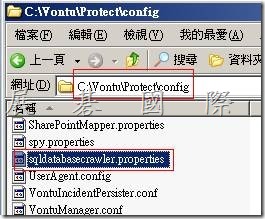
    4 sqldatabasecrawler.properties 檔案可能也必須修改為指定選定驅動程式

    的正確 JAR 名稱。

    C:\Vontu\Protect\config
    clip_image014

    請參閱第 1012 頁的「SQL 資料庫掃描組態內容」。

    SQL 資料庫掃描組態內容

    您可以在 Network Discover Server 上的 sqldatabasecrawler.properties 組態

    檔中編輯以下組態內容:

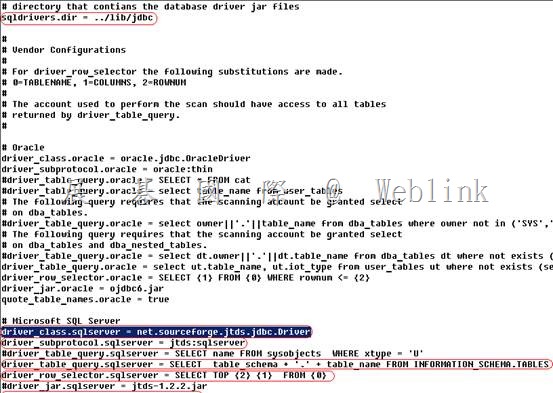
    l driver_class.vendor_name

    指定要使用的 JDBC 驅動程式的類別名稱。此驅動程式的 JAR 檔案必須包含在

    sqldrivers.dir 中所指定的目錄,並必須命名為 driver_jar.vendor_name。

    範例:

    driver_class.sqlserver = net.sourceforge.jtds.jdbc.Driver

    l driver_subprotocol.vendor_name

    指定 JDBC 連線字串的子通訊協定部分。

    範例:

    driver_subprotocol.sqlserver = jtds:sqlserver

    l driver_jar.vendor_name

    指定驅動程式所需的 JAR 檔案清單。JAR 檔案儲存在 sqldrivers.dir 中所指

    定的目錄。

    請參閱第 1011 頁的「安裝 SQL 資料庫目標的 JDBC 驅動程式」。

    範例:

    driver_jar.sqlserver = jtds-1.2.2.jar

    driver_jar.db2 = db2jcc.jar, db2jcc_license_cu.jar

    l driver_table_query.vendor_name

    指定傳回要掃描之表格清單所要執行的查詢。通常,查詢應傳回資料庫中的所

    有使用者表格。請注意,執行此查詢的資料庫帳戶需要由資料庫管理員授予其

    適當的權限。

    您必須使用帳戶來掃描能夠在 sqldatabasecrawler.properties 中設定

    driver_table_query 的內容,並傳回結果。您可以使用 sqlplus 以掃描使用

    設定 SQL 資料庫的掃描

    SQL 資料庫掃描組態內容

    1012

    者身分登入來測試掃描組態,並執行查詢。如果取得結果,您便擁有完成掃描

    的權限。如果沒有取得結果,則您必須變更查詢,或變更掃描使用者的權限。

    範例:

    driver_table_query.sqlserver = SELECT table_schema

    + ‘.’ + table_name FROM information_schema.tables

    l driver_row_selector.vendor_name

    指定用於從表格選取列的查詢格式。此廠商名稱會視資料庫而異。對於最常見

    的資料庫,sqldatabasecrawler.properties 組態檔包含了範例。

    查詢中使用以下替代變數:

    0=TABLENAME

    1=COLUMNS

    2=ROWNUM

    範例:

    driver_row_selector.sqlserver = SELECT TOP {2} {1} FROM {0}

    l quote_table_names.vendor_name

    指定是否在建立列選擇查詢之前將表格名稱用引號括起來。啟用此功能會允許

    掃描含有數字名稱的表格。例如,將名稱用引號括起來後,Payroll.1 變為

    “Payroll”.“1”。

    範例:

    quote_table_names.sqlserver=true

    l sqldrivers.dir

    指定放置 JDBC 驅動程式 JAR 檔案的目錄位置。
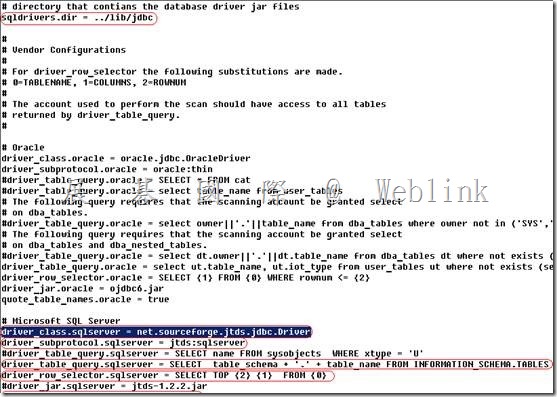
    clip_image016

    clip_image018

    clip_image020

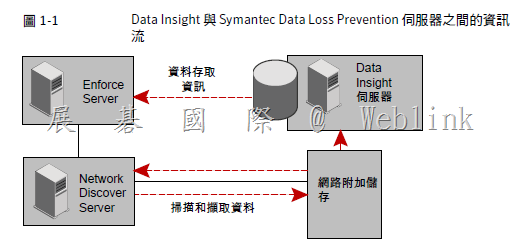
  • DLP 整合 Data Insight

    DLP 整合 Data Insight

    l 安裝 Data Insight

    l 安裝DLP (Network Discover)

    clip_image001

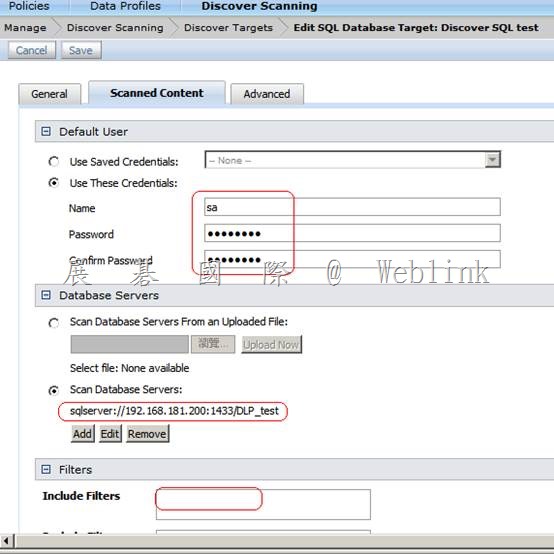
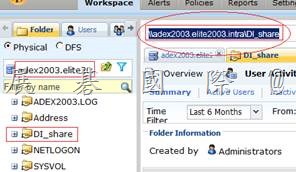
    l 在 Enforce建立 Discover Target (csan 的 path 要與 Data Insight 上的 path 一致,否則 Data Insight attribute 會 lookup 不出來)

    clip_image003

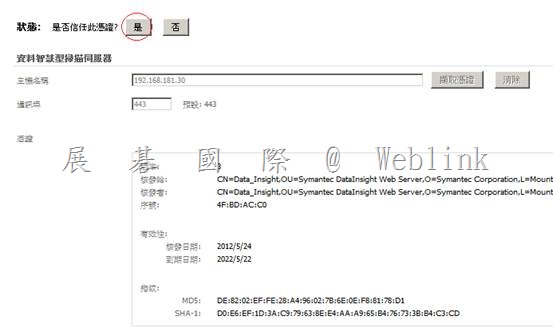
    l 設定 Enforce server 與 Data Insight Management Server 的連線

    (DLP 若未匯入 Data Insight license file,請先匯入 Data Insight license file,並重啟 Incident Persister 服務)

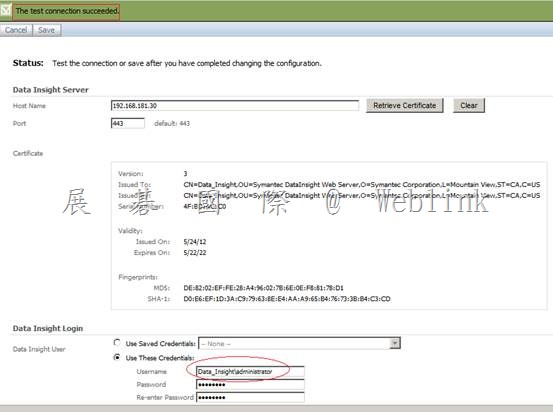
    l 測試 Enforce server 與 Data Insight Management Server 的連線

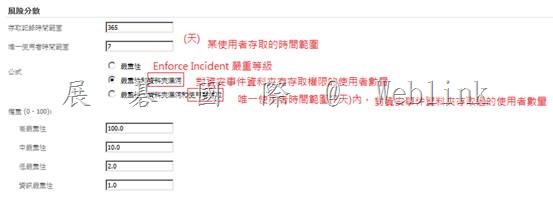
    l 架構風險分數、時間範圍以報告有風險的資料夾

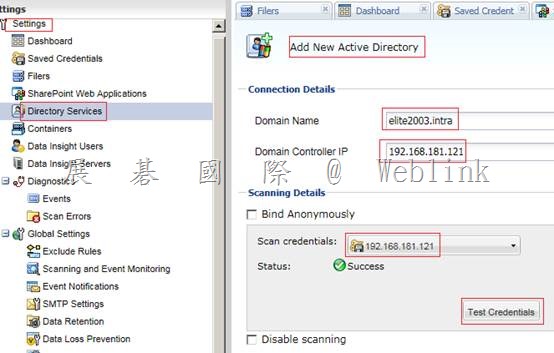
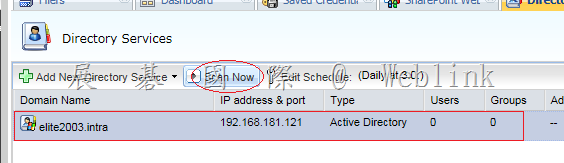
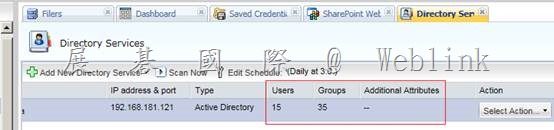
    l 在Data Insight Management Server 新增 Directory Service

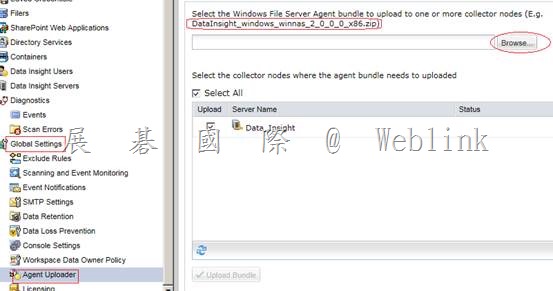
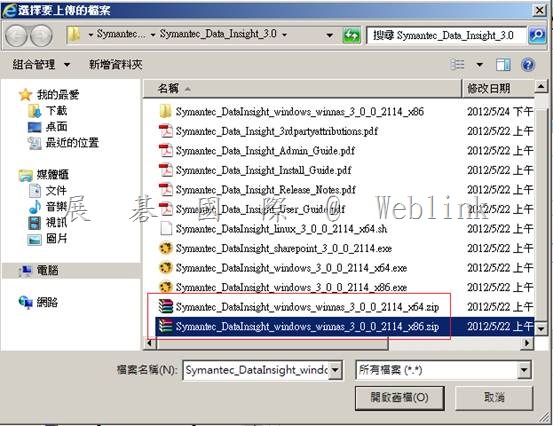
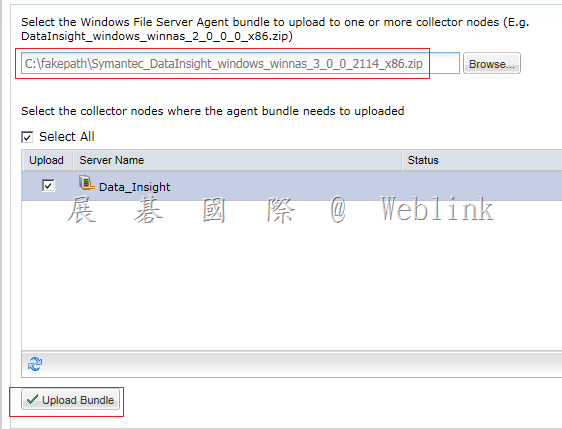
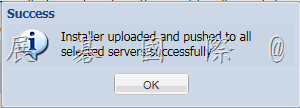
    l 在Data Insight Management Server上傳 Agent

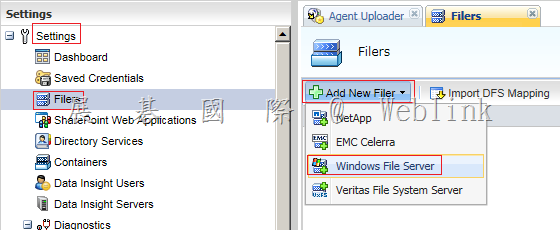
    l 在Data Insight Management Server Add filter

    l Data Insight Management Server 參數設定

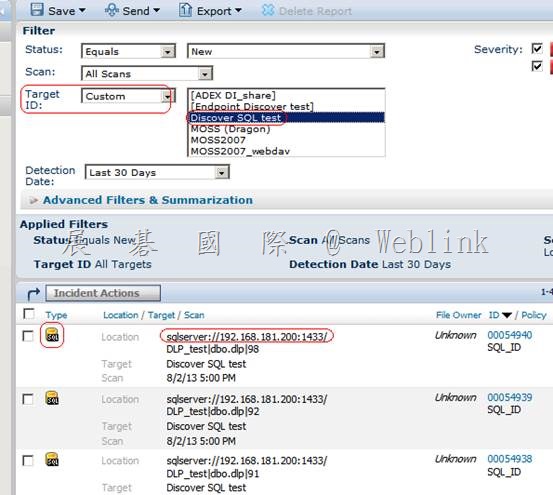
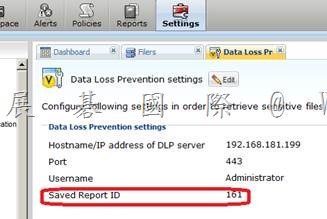
    l 在 DLP Enforce server 建立自訂的 Network Discover Report 以取得 saved report ID

    l 在Data Insight Management Server 設定DLP

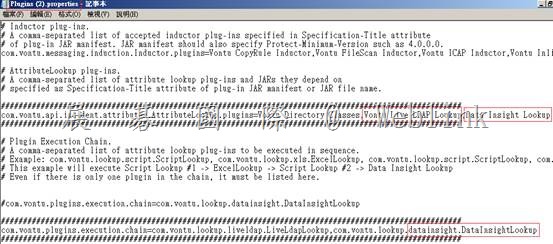
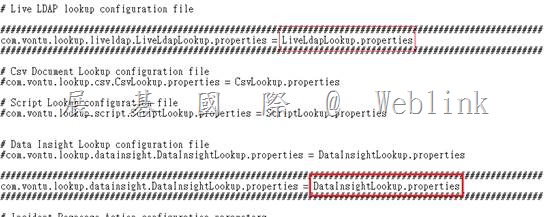
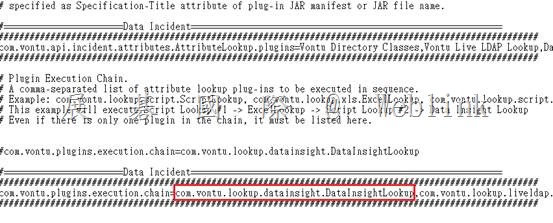
    l Data Insight 查詢外掛程式 (plugings.properties、datainsightlookup.properties)

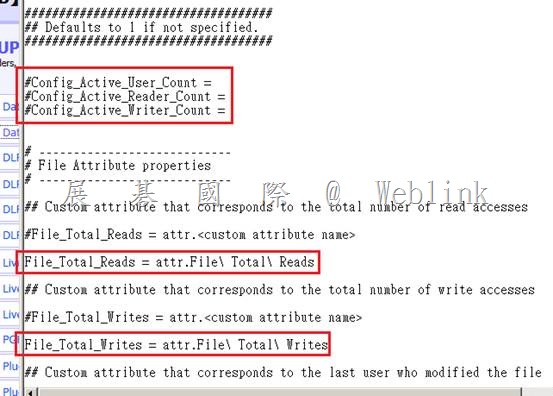
    l 在 DLP Enforce自訂屬性

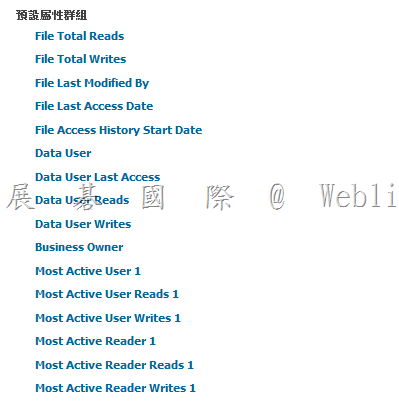
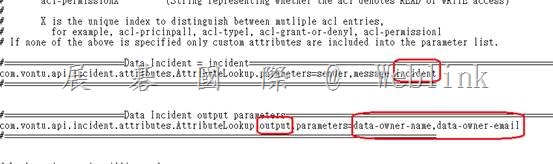
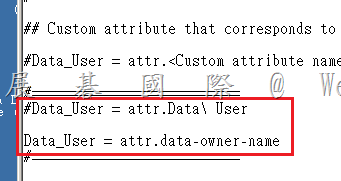
    l datainsightlookup.properties→架構 Data Insight 外掛程式來填入 [資料擁有者] [資料擁有者 E-mail]

    l 測試

    l Business Unit、Business Unit Owner

    clip_image005

    allen_chung@elite2003.intra,KS010S,allen chung

    denny_liu@elite2003.intra,KS010S,allen chung

    alex_chien@elite2003.intra,KS010S,allen chung

    jach_lin@elite2003.intra,KS010S,allen chung

    jach_lin@elite2003.intra,KS010S,allen chung

    gordon_lee@elite2003.intra,KS010S,allen chung

    cd C:\Program Files\Symantec\DataInsight\bin

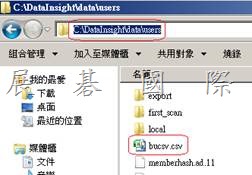
    adcli.exe –mode importbu csvfile C:\DataInsight\data\users \bucsv.csv

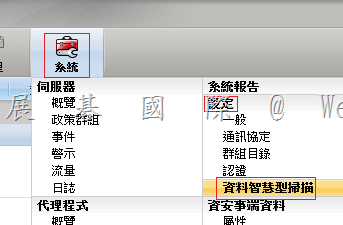
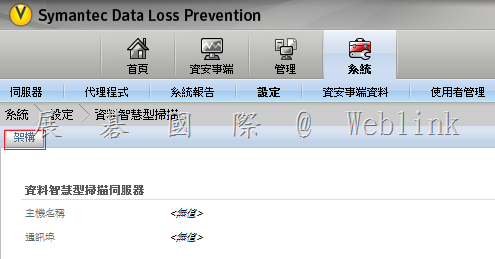
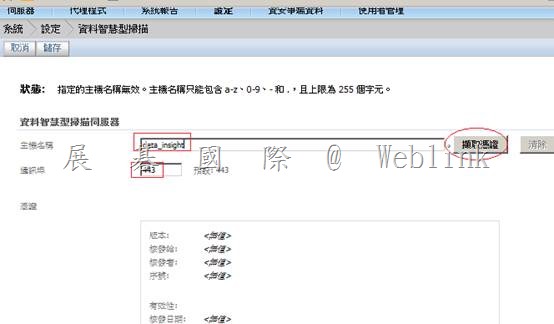
    l 設定 Enforce server 與 Data Insight Management Server 的連線

    (DLP 若未匯入 Data Insight license file,請先匯入 Data Insight license file,並重啟 Incident Persister 服務)

    clip_image006

    clip_image007

    clip_image009

    clip_image011

    l 測試 Enforce server 與 Data Insight Management Server 的連線

    clip_image013

    註:請還是將電腦名稱改為 data-insight (不要用 data_insight),不然之後安裝 Data Insight Agent 會有問題

    【A connection could not be established to the specified server.】

    【I can’t make a connection to the Data Insight Management server】

    https://kb-vontu.altiris.com/display/1n/kb/article.asp?aid=52328&n=2&s=

    Data_Insight (Host Nmae 不接受 _,只好打 IP)

    IP 又與 CN 不 match,因此出現

    【A connection could not be established to the specified server.】

    【How do I turn off host name validation for the connection to Data Insight?】

    https://kb-vontu.altiris.com/display/1n/kb/article.asp?aid=52329&link=

    在 Enforce server 上停用 Host Nmae 驗證

    Yes, the host name verification can be turned off in the Data Loss Prevention Enforce server.

    In the file Vontu\Protect\config\DataInsightConnection.properties fine the line,

    matrixcommunication.auth.doCertificateValidation = true

    and change true to false.

    matrixcommunication.auth.doCertificateValidation = false

    matrixcommunication.auth.donameValidation = false

    Save the file and restart the Enforce Manager.

    l 架構風險分數、時間範圍以報告有風險的資料夾

    clip_image015

    l 在Data Insight Management Server 新增 Directory Service

    clip_image017

    clip_image018

    clip_image020

    l 上傳 Agent

    clip_image022

    clip_image024

    clip_image025

    clip_image026

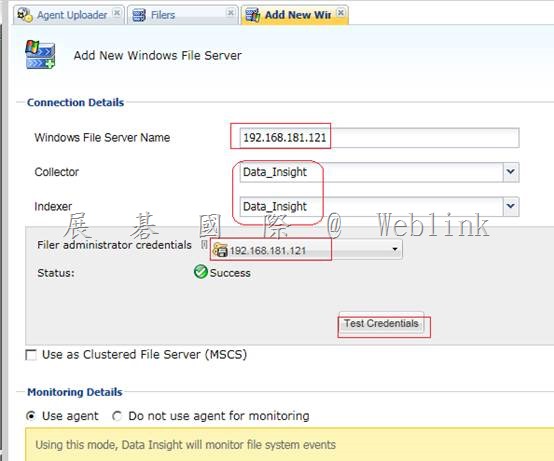
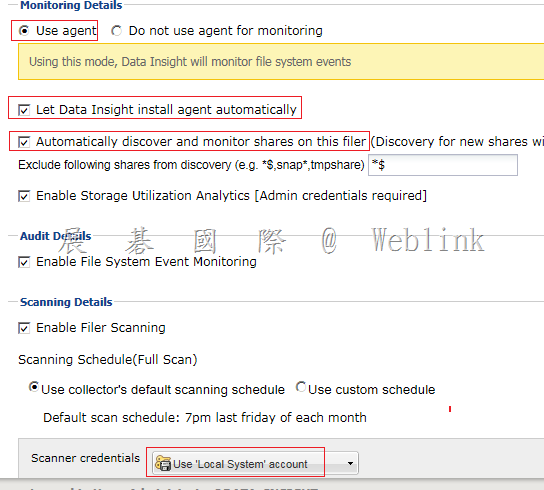
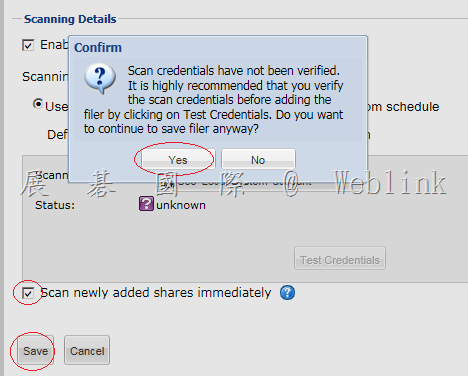
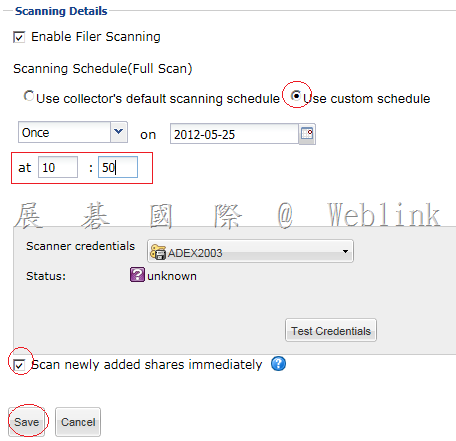
    l Add Windows File Server Filer

    clip_image027

    輸入電腦名稱 (電腦名稱使用 Data-Insight)

    clip_image029

    clip_image030

    clip_image031

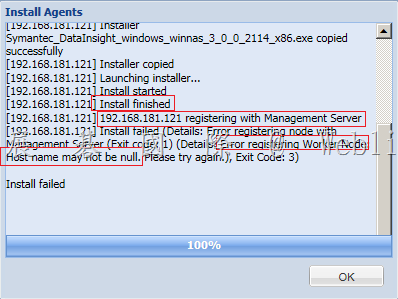
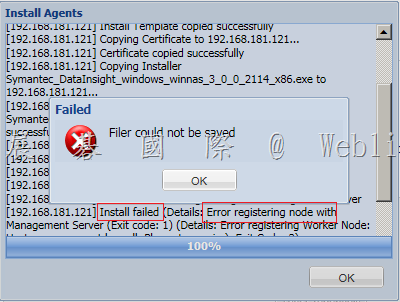
    將電腦名稱改為 data-insight (不要用 data_insight),不然安裝 Data Insight Agent 會有此問題

    clip_image032

    ?

    Error registering node with Management Server (Exit code:1)

    Error registering Worker node Host name may not be null (Exit code:3)

    clip_image033

    l Data Insight Management Server 參數設定

    clip_image034

    l 在 DLP Enforce server 建立自訂的 Network Discover Report 以取得 saved report ID

    l 在Data Insight Management Server 設定DLP

    clip_image036

    l Data Insight 查詢外掛程式

    Plugins.properties

    clip_image038

    clip_image040

    重啟

    Vontu manager

    Vontu Incident Persister

    l 自訂屬性

    DataInsightLookup.properties

    clip_image042

    clip_image043

    l 架構 Data Insight 外掛程式來填入 [資料擁有者] [資料擁有者 E-mail]

    ?

    Plugins.properties

    clip_image045

    clip_image046

    clip_image048

    l 測試

    測試 Enforce server 與 Data Insight Management Server 的連線

    Plugins.properties 若變更

    重啟

    Vontu manager

    Vontu Incident Persister

  • RAR 加密檔案偵測政策 → 使用 【fileanalyzer_windows_4_0_1.exe】偵測自定義檔案格式

    RAR 加密檔案偵測政策

    1#

    啟用自訂檔案類型偵測:

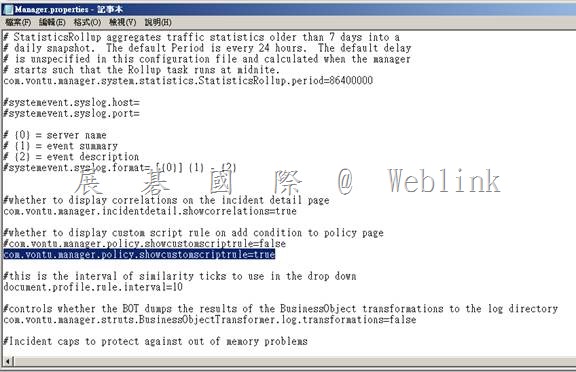
    依預設,不會啟用自訂檔案類型政策規則。若要實作「自訂檔案類型特徵」條件﹐您必須先啟用它。
    啟用「自訂檔案類型特徵」規則

    A. 使用文字編輯器開啟檔案 C:\Vontu\Protect\config\Manager.properties

    B. 將以下選項設定為 true﹕com.vontu.manager.policy.showcustomscriptrule=true

    C 停止並重新啟動 Vontu Manager 服務。
    clip_image002

    2#

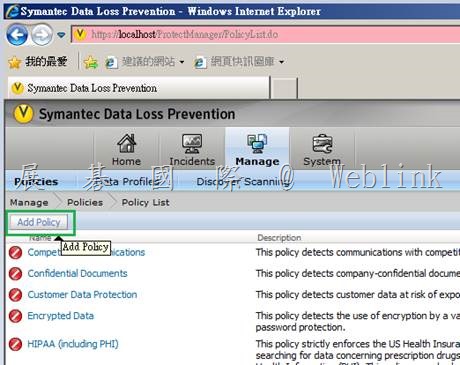
    (1) 新增Policy

    clip_image004

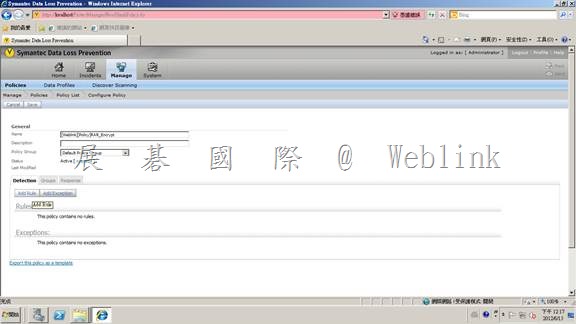
    (2) 在Policy中新增Rule

    clip_image006

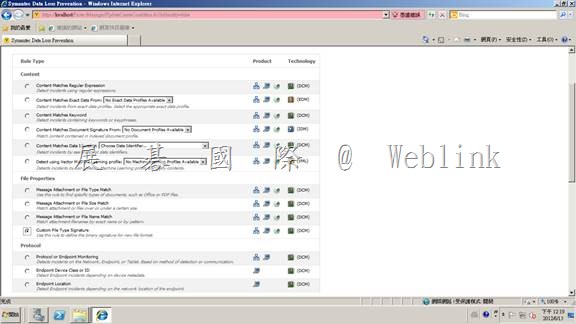
    (3) 選擇 Custom File Type Signature 後 Next

    clip_image008

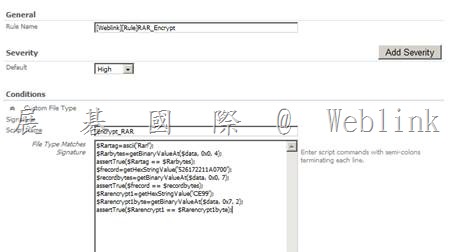
    (4) 填寫自訂檔案類型與偵測技術資訊 (請參考下方【註】說明來建立標頭偵測規則 )

    clip_image010

    【註】使用 【fileanalyzer_windows_4_0_1.exe】偵測自定義檔案格式

    ● 找到 Symantec_DLP_12.5_Platform_Win-IN_b\DLP\12.5\File_Type_Analyzer 目錄

    ● 在此目錄下執行【fileanalyzer_windows_4_0_1.exe】以安裝 DLP File_Type_Analyzer

    ● 執行 【C:\Program Files (x86)\File Analyzer】目錄下 【analyzer_gui.exe】

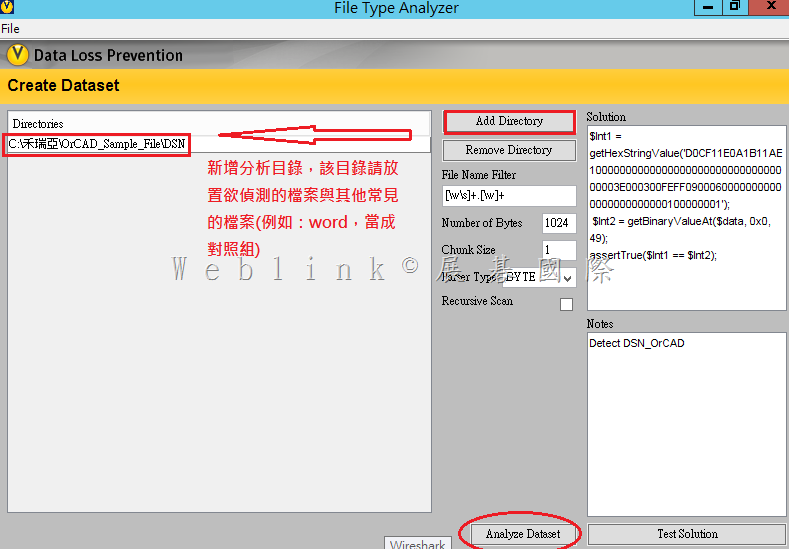
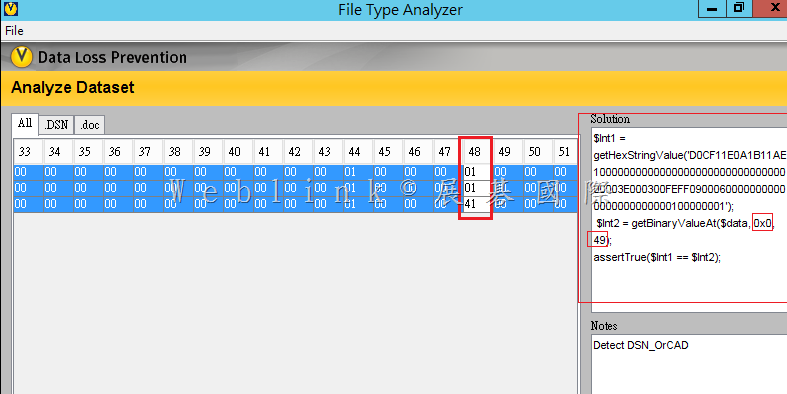
    ● 在畫面中按下 【Add Directory】來新增分析目錄,該目錄請放置欲偵測檔案與其他常見的檔案 (例如:word,當成對照組)

    ●  【File Name Filter】請輸入【[\w\s]+.[\w]+】

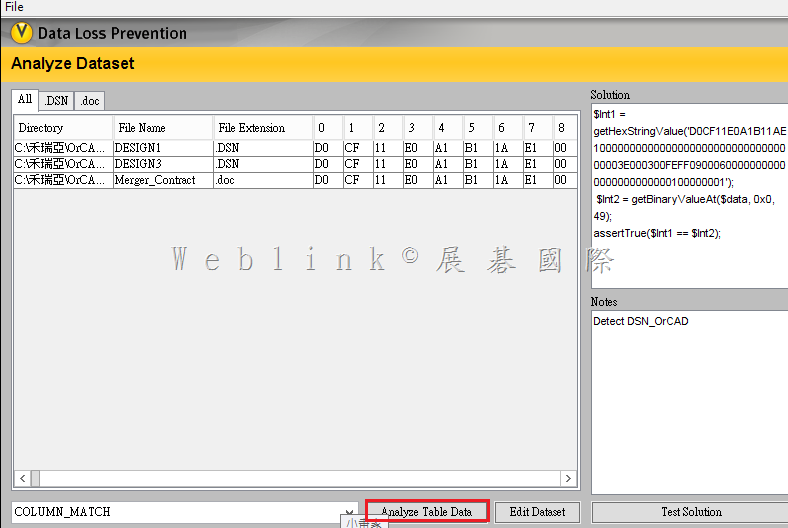
    ●  按下【Analyze Dataset】進行兩個不同型態的檔案的標頭差異分析

    image

    ●  再按下【Analyze Table Data】進行表格的差異分析

     image

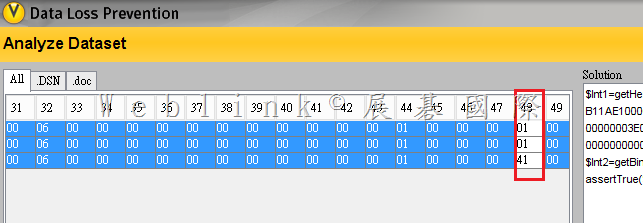
    ●  可以發現 .DSN 與 .doc【一直到第 48 格 】才有所差異

    http://www.symantec.com/connect/forums/sdlp-and-custom-file-type-detection-file-type-analyzer

    image

    ●  所以我們可以在【Solution 】中輸入以下的標頭偵測規則

    $Int1 = getHexStringValue(‘

    $Int1=getHexStringValue(‘D0CF11E0A1B11AE1000000000000000000000000000000003E000300FEFF09000600000000000000000000000100000001‘);
    $Int2=getBinaryValueAt($data,0x0,49);
    assertTrue($Int1==$Int2);

    image

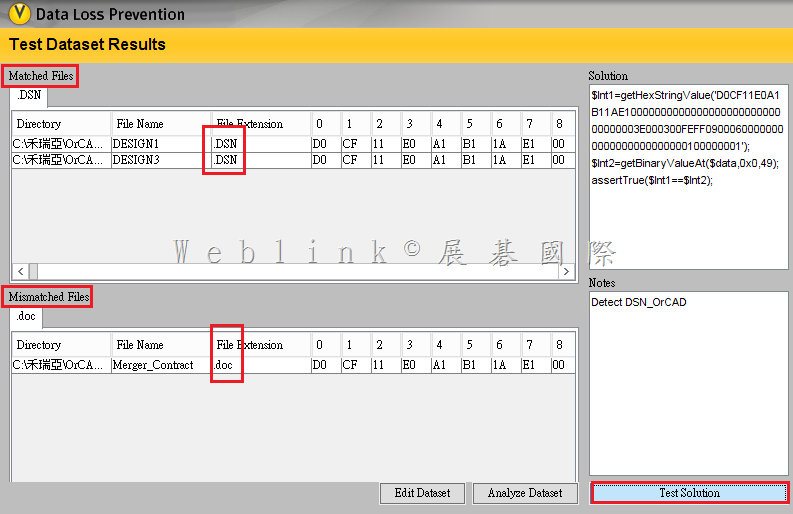
    ●  按下【Test Solution】發現確實只有 .DSN 檔案格式被偵測到

    image

    以下為 .rar 測試規則

    File Type Matches Signature 值

    $Rartag=ascii(‘Rar!’);

    $Rarbytes=getBinaryValueAt($data, 0x0, 4);

    assertTrue($Rartag == $Rarbytes);

    $frecord=getHexStringValue(‘526172211A0700’);

    $recordbytes=getBinaryValueAt($data, 0x0, 7);

    assertTrue($frecord == $recordbytes);

    $Rarencrypt1=getHexStringValue(‘CE99’);

    $Rarencrypt1byte=getBinaryValueAt($data, 0x7, 2);

    assertTrue($Rarencrypt1 == $Rarencrypt1byte);

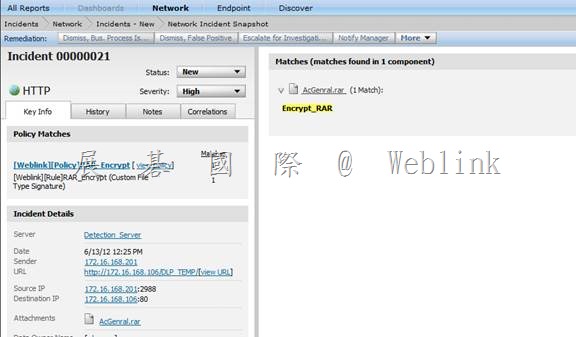
    (5) 確認偵測事件

    clip_image012

  • SEE 整合 DLP

    SEE 整合 DLP

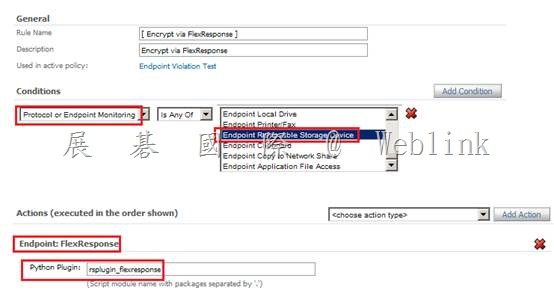
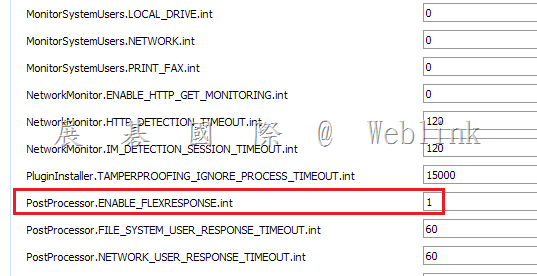
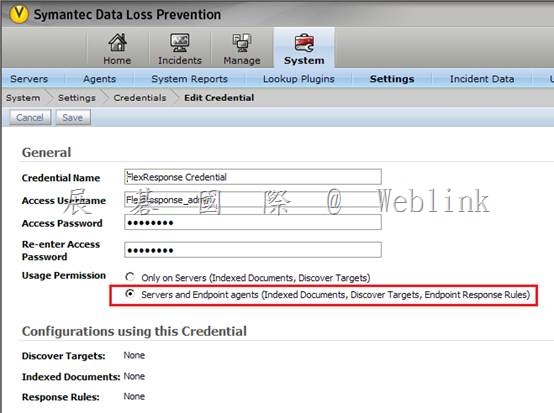
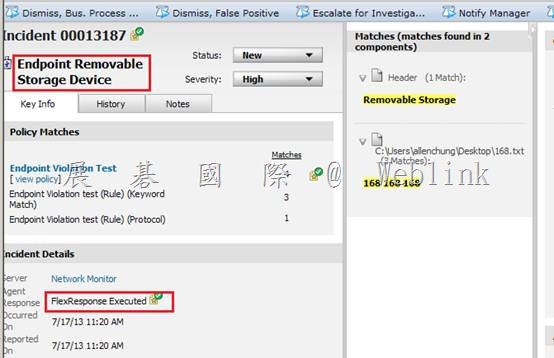
    1. DLP 相關設定

    clip_image002

    clip_image004

    clip_image006

    clip_image007

    clip_image008

    clip_image010

    clip_image012

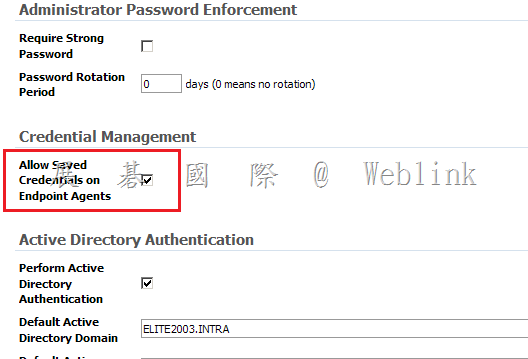
    2. SEE 相關設定

    3. 用戶端需進行以下安裝

    l DLP Endpoint Agent

    l SEE (Framework Client、RES)

    l 透過 flrinst.exe utility啟用 FlexResponse Plug-in

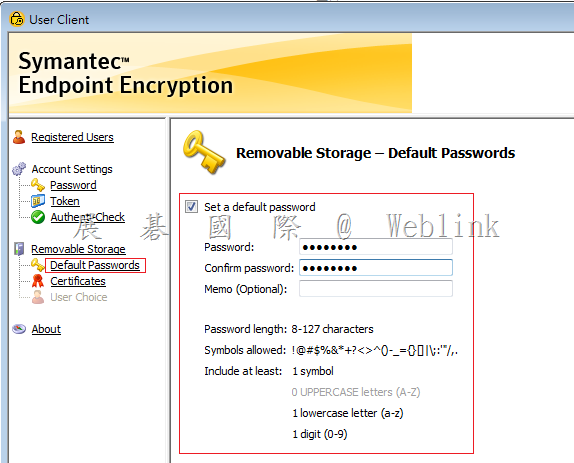
    l 在 SEE User Client 設定好 Default Passw0rd

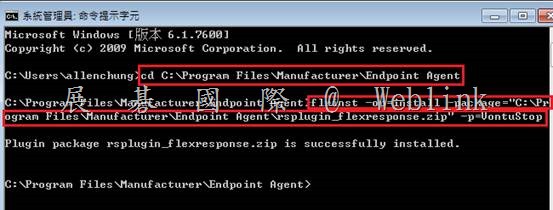
    【透過 flrinst.exe utility啟用 FlexResponse Plug-in】

    cd C:\Program Files\Manufacturer\Endpoint Agent

    flrinst -op=install -package=”C:\Program Files\Manufacturer\Endpoint Agent\rsplugin_flexresponse.zip” -p=VontuStop

    clip_image014

    【在 SEE User Client 設定好 Default Password】

    clip_image015

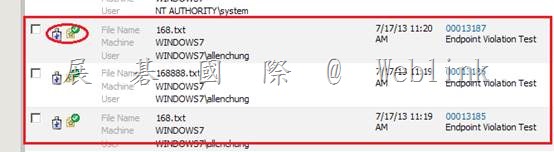
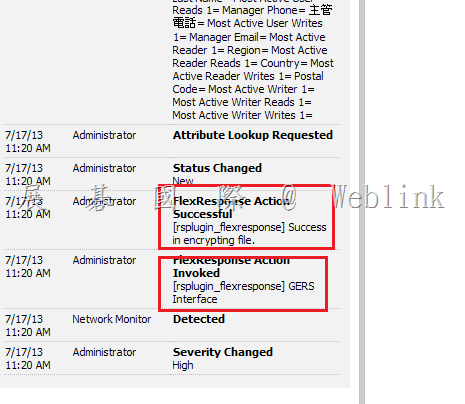
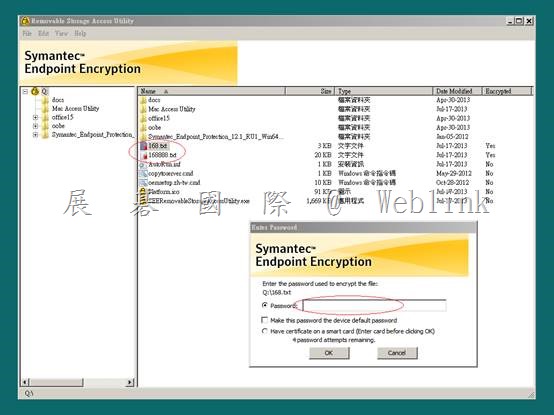
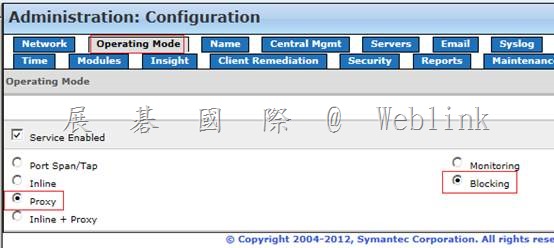
    4. 驗證

    clip_image017

    clip_image018

    clip_image020

  • SWG5 整合 DLP 相關設定

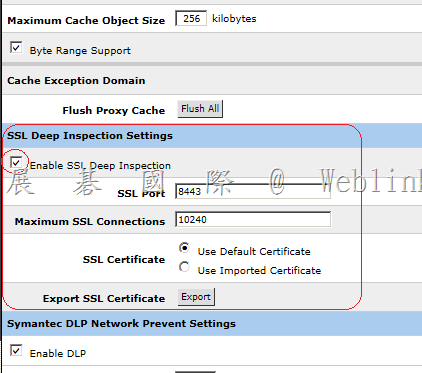
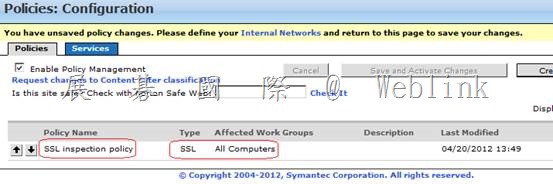
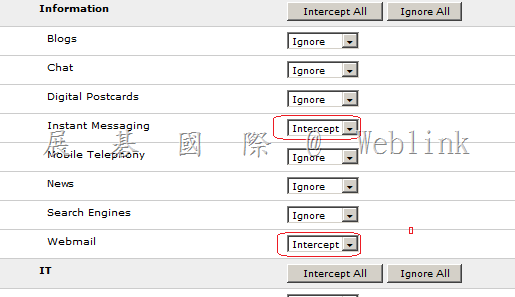
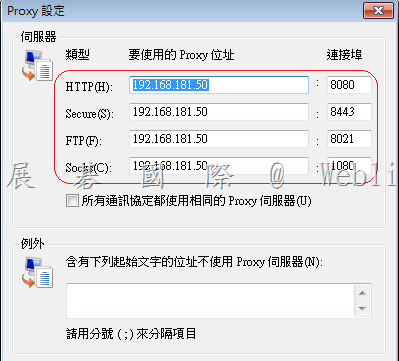
    SWG5 整合 DLP 相關設定

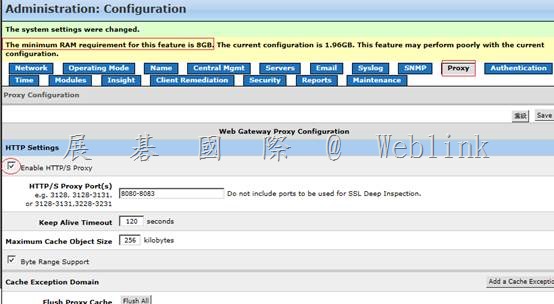
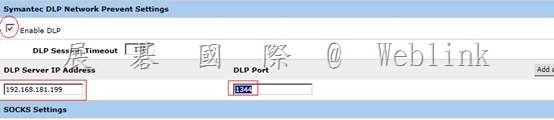
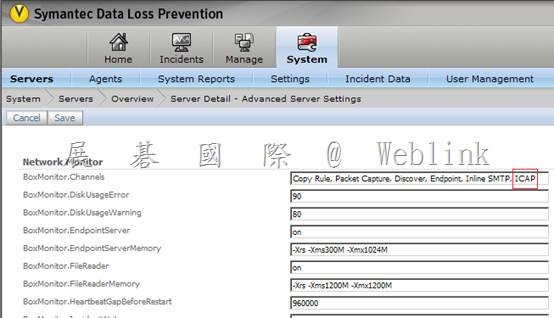
    clip_image002

    clip_image004

    clip_image006

    clip_image008

    clip_image010

    clip_image012

    clip_image014

    clip_image016

    clip_image018

    【HTTPS】

    clip_image019

    clip_image020

    clip_image022

    Gmail

    clip_image023

    clip_image024

    clip_image025

    clip_image026

    clip_image027

    clip_image029

    clip_image031

    Hotmail HTTP

    clip_image033

    clip_image035

    Hotmail – HTTP

    clip_image036

    clip_image037

    clip_image039

  • SMG 整合 DLP 相關設定

    SMG 整合 DLP 相關設定

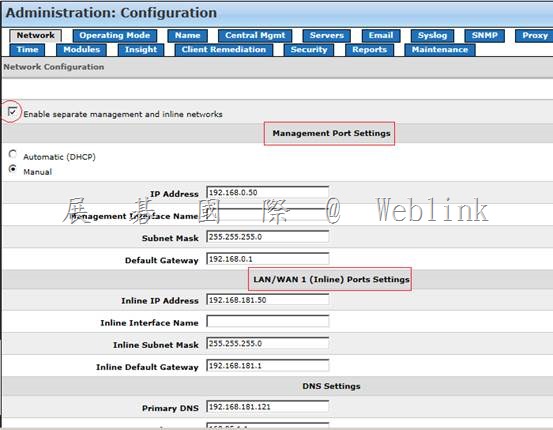
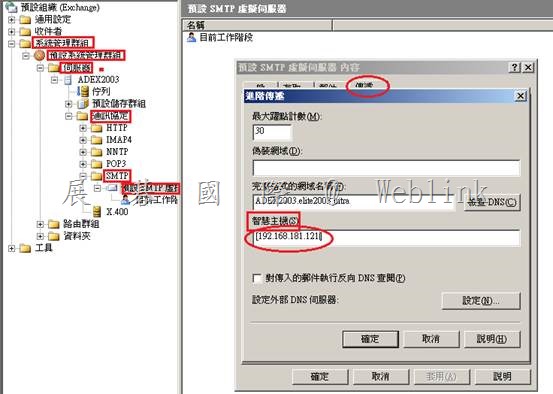
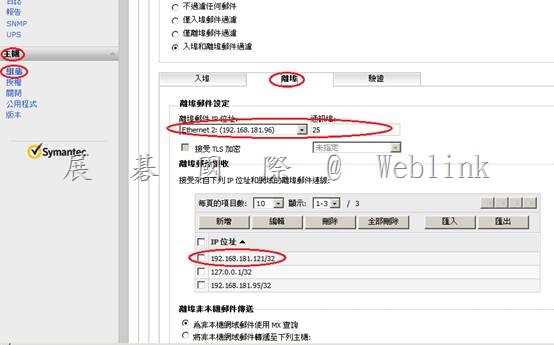
    智慧主機指向 SMG [192.168.181.96]

    clip_image002

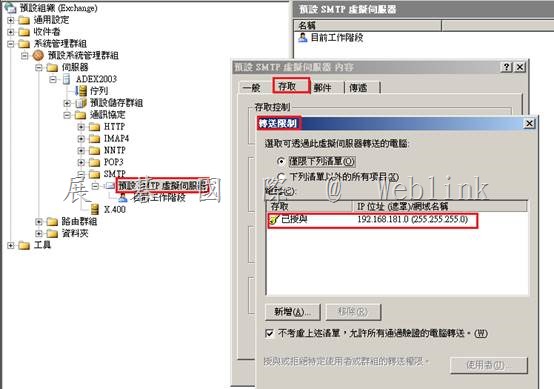
    設定允許轉送

    clip_image004

    SMG接受來自 Exchange smart host 轉過來的信

    clip_image006

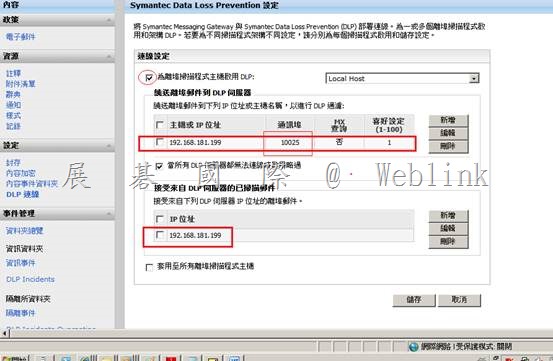
    在 SMG 上設定寄出信件先送至 DLP 檢查

    clip_image008

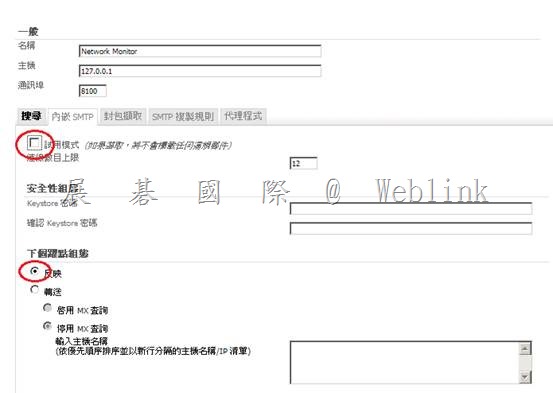
    設定 DLP 使用 reflect mode來與 SMG 互動,並取消試用模式

    clip_image010

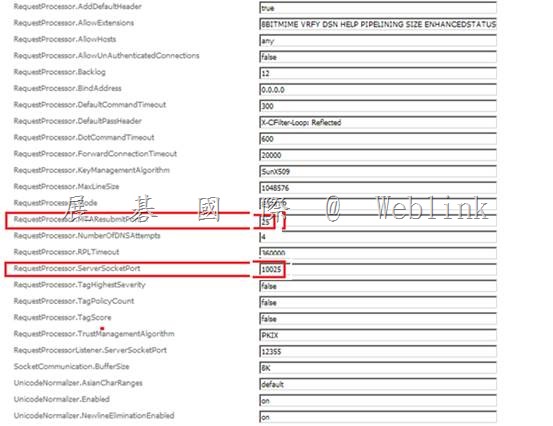
    DLP 檢查完信件後,將信還給 SMG 的 25 port (DLP 預設值為 10026)

    RequestProcessor.MTAResubmitPort=10026 – 25

    RequestProcessor.ServerSocketPort=10025

    clip_image011clip_image012clip_image014

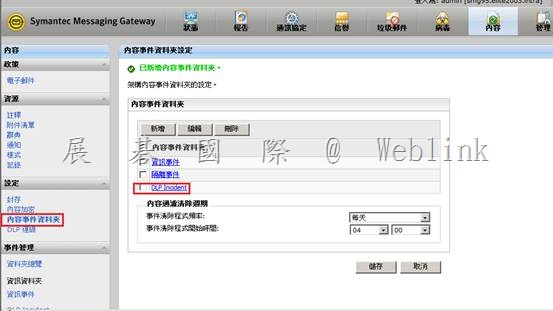
    建立 DLP 事件隔離資料夾

    clip_image016

    設定 DLP 的 Response Rule

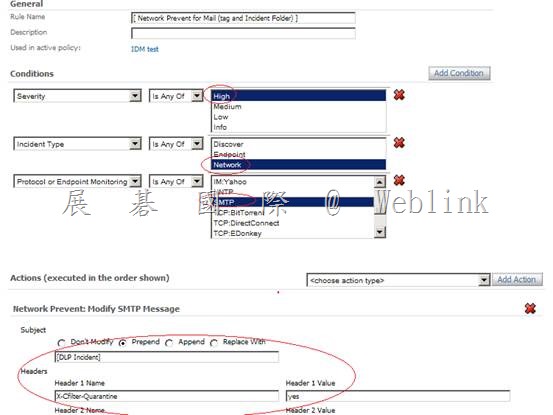
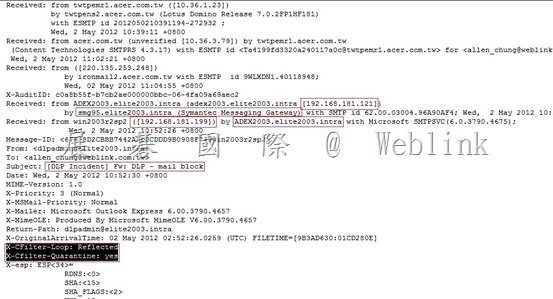
    將違反 DLP policy 的信件標頭加上 X-cfilter-Quarantine: yes 的值

    clip_image018

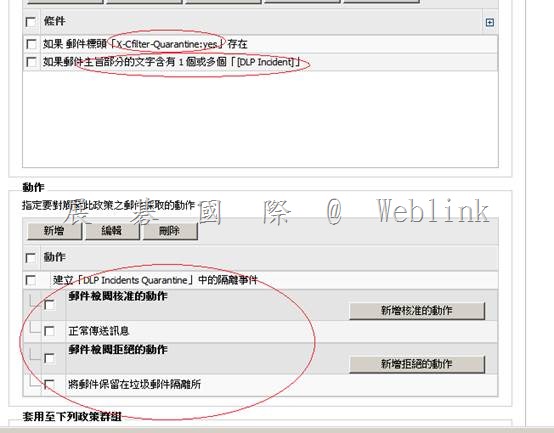
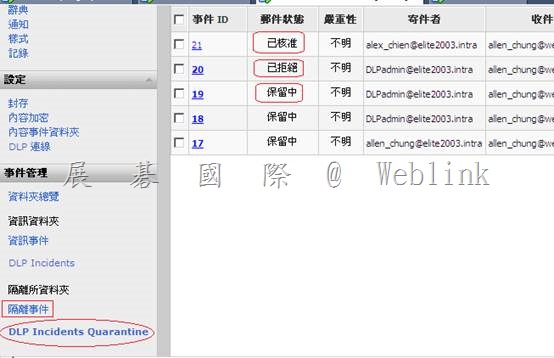
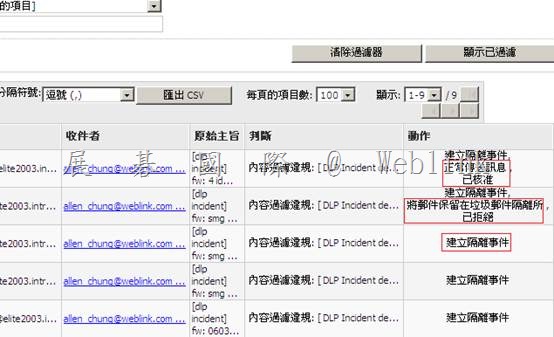
    SMG 將信件標頭含有 X-cfilter-Quarantine: yes值的信,隔離到 [DLP Incidents Quarantine] 隔離資料夾

    clip_image020

    clip_image022

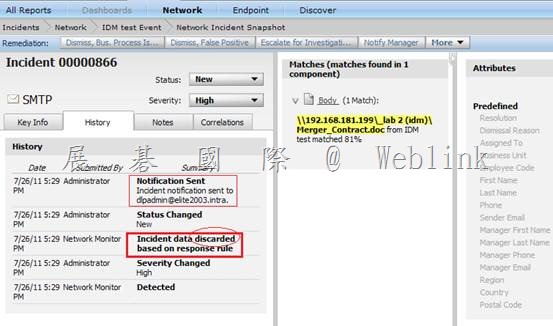
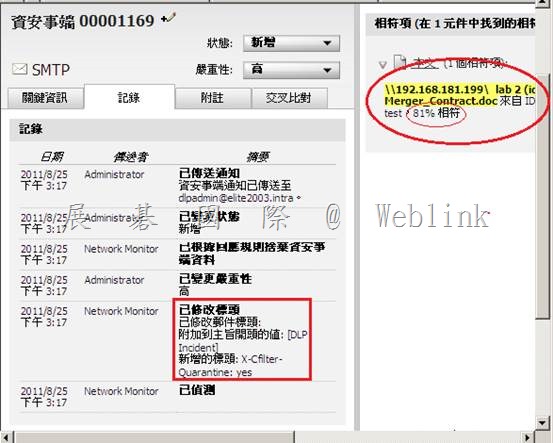
    以下是 DLP Incident

    clip_image024

    以下是 SMG [DLP Incidents Quarantine] 隔離資料夾

    clip_image026

    以下是 SMG 郵件稽核日誌

    clip_image028

    clip_image030

  • 【DLP Endpoint Agent Pull】

    【DLP Endpoint Agent Pull】

    Additionally please provide logs from the Endpoint Agent via the Enforce UI:

    Go to System -> Agent Overview

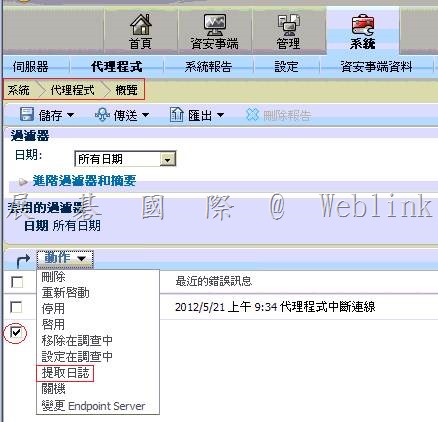
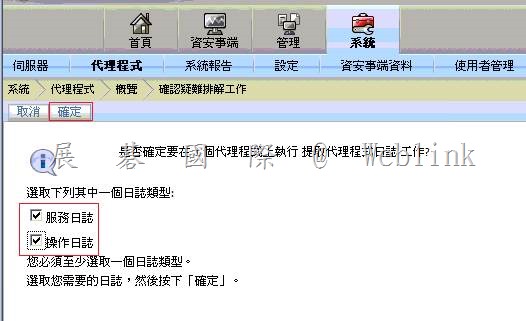
    至【系統】→【代理程式】→【概覽】

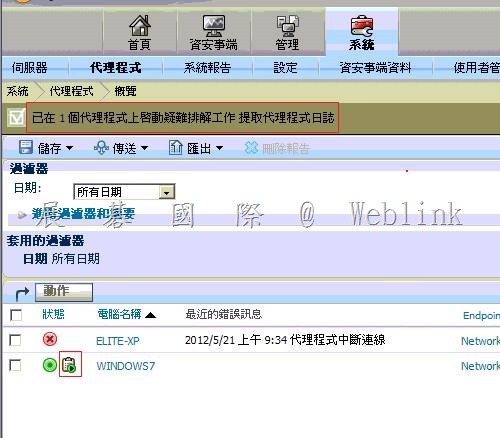
    Select the agent you want and from the Actions pull down, select Pull Logs.

    選擇那台要 copy .pst 檔到用戶端電腦 → 點選【動作】→ 【提取日誌】

    clip_image002

    Select both Services logs or Operational logs and click OK

    clip_image004

    clip_image006

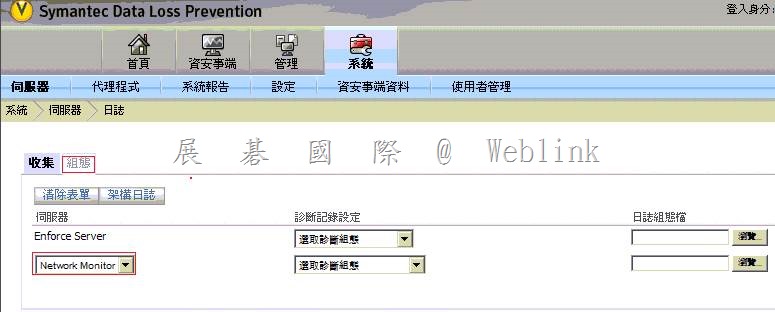
    Next, the logs need to be pulled from the Endpoint Server to the Enforce Server

    Go to System -> Servers -> Logs

    Select the Endpoint Server from the drop down and check the Agent logs box.

    至【系統】→【伺服器】→【日誌】→【組態】→【下拉選擇您的偵測伺服器】

    clip_image008

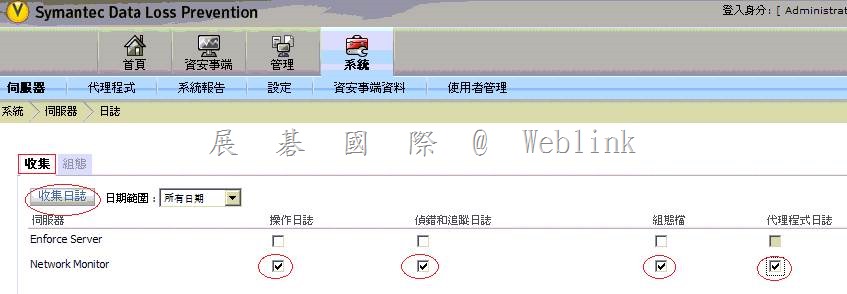
    至【系統】→【伺服器】→【日誌】→【收集】→【勾選 操作日誌、偵錯和追蹤日誌、組態檔、代理程式日誌】

    並按下【收集日誌】

    Then click on the Collect Logs button.

    clip_image010

    This will retrieve the logs from the Endpoint Agent.

    Download the logs and send them to us by replying to this mail with the attachment.

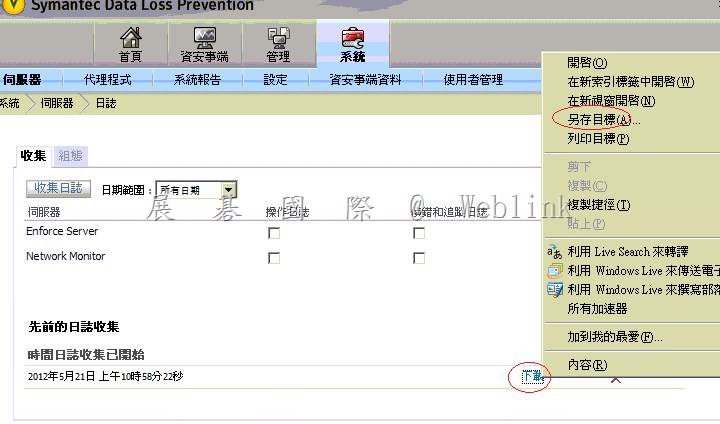
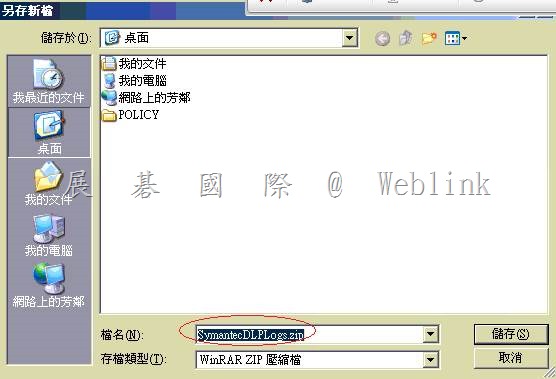
    一段時間後,按下右上角的重新整理圖示,帶畫面下方出現【下載】連結時,下載【SymantecDLPLogs.zip】

    clip_image012

    請將 SymantecDLPLogs.zip 以附件的方式提供給我們

    clip_image014

  • SEP Troubleshooting


    How to enable Sylink debugging for the Symantec Endpoint Protection 11.x and 12.1 client in the Windows Registry

    http://www.symantec.com/business/support/index?page=content&id=TECH104758


    Symantec Endpoint Protection Client installation failed: error “”Pending system changes that require a reboot have been detected” ”

    http://www.symantec.com/business/support/index?page=content&id=TECH208775


    Symantec Endpoint Protection 12.1: Best Practices for Disaster Recovery with the Symantec Endpoint Protection Manager

    http://www.symantec.com/business/support/index?page=content&id=TECH160736